Fast Collision Detection with Distance Functions
How to write circle-vs-rectangle collision detection with a distance function and no branching. Why folding space with absolute values and subtracting the radius from a distance is enough, explained with diagrams and a Processing sample.
Contents
The other day it occurred to me that “maybe a distance function can do collision detection,” so I tried implementing it. In this post I’ll introduce fast collision detection with distance functions, using circle-vs-rectangle as the example.
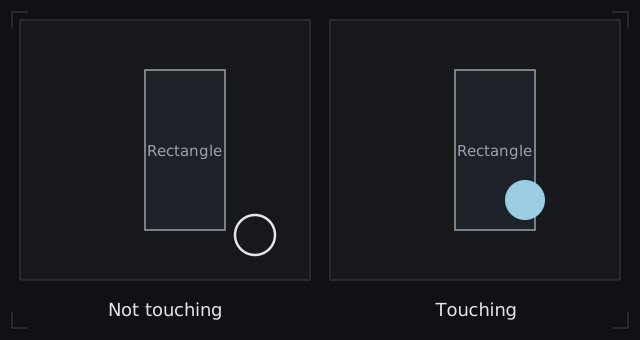
The trouble with collision detection
When you make a game with something like Processing, you almost always end up writing collision detection. But circle-vs-rectangle or circle-vs-line-segment turns out to need surprisingly complicated formulas once you actually sit down to write it, and that’s often a bad feeling.
On top of that, to cut the cost you sometimes split the code by shape, one path for rectangles and another for line segments, and the program gets complicated.
The detection I’m introducing here makes these checks fast, and it also generalizes them so that different shapes can be written the same way.
Collision detection with a distance function
Before getting to the implementation and its explanation, let me explain the principle of distance-function collision with a simple example.
Circle-vs-circle is probably the first collision test most people write. And that test is, in fact, already a distance-function test. Here’s the implementation.
boolean circleCollision(float distance, float r1, float r2) {
  return distance <= r1 + r2;
}Here distance is the distance between the two circles’ centers, and r1 and r2 are their radii.
Circle-vs-circle detection does these four things:
- Take one circle’s center as the origin
- Find the distance between the two centers
- Add the two radii
- If the distance between the centers is at most the sum of the radii, they’re touching
Two things in here are worth noting: in step 1, you take one center as the origin, and in step 3, you add the radii.
In step 1, placing one shape’s center at the origin lets you use the shape’s own symmetry (such as line symmetry) to keep the calculation efficient.
Step 3 can be read as “shrink one circle down to a point, and inflate the other circle by the amount you shrank.” If the circle you shrink has radius r1 and the one you inflate has radius r2, the inflated circle has radius r1 + r2. In other words, circle-vs-circle turns into a test between a “point” and a “circle of radius r1 + r2.”
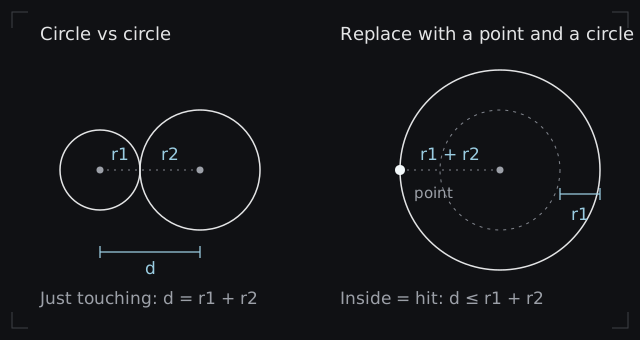
This way of rereading it really pays off for tests involving complex shapes such as rounded rectangles.
Implementation (circle and rectangle)
I’ve covered the rough principle and the idea behind it, so let’s move on to the main part.
I used this site as a reference when implementing the detection.
2次元ディスタンスフィールドまとめ - Qiitaはじめに iq先生の2Dディスタンスフィールド(SDF)解説 を見ましょう。3Dの方は有名なのですが、こっち見逃してました。。。もっと早く知りたかった ディスタンスフィールド(距離関数)とは 相手との距離を返す関数です。 glslのフラグメントシェーダーでシェイプを描く...
First, the implementation.
float length(float x, float y) {
  return sqrt(x * x + y * y);
}

boolean roundRectDistFunc(float halfWidth, float halfHeight, PVector p, float radius) {
  float dx = abs(p.x) - halfWidth;
  float dy = abs(p.y) - halfHeight;
  return length(max(dx, 0.0), max(dy, 0.0)) - radius <= 0;
}Here halfWidth and halfHeight are half of the rectangle’s width and height, p is the position of the circle’s center with the rectangle’s center as the origin, and radius is the circle’s radius.
If the rectangle is rotated, work out p first, then rotate p by the opposite of the rectangle’s rotation before passing it in, and the same formula works.
I’ve also included sample code that runs in Processing, but it’s fairly long, so I’ve folded it away.
Sample code that runs in Processing
Ball ball;
Box box;

void setup() {
  size(1280, 720);
  rectMode(CENTER);
  textSize(24);
  ball = new Ball(new PVector(), 20);
  box = new Box(new PVector(width * 0.5, height * 0.5), new PVector(100, 200));
}

void draw() {
  background(16);
  ball.position.set(mouseX, mouseY);
  boolean hit = ball.hits(box);

  box.display();
  ball.display(hit);

  // The result is also shown as text, so it's readable even if the colors are hard to tell apart
  fill(255);
  textAlign(LEFT, TOP);
  text(hit ? "HIT" : "MISS", 16, 16);
}

float length(float x, float y) {
  return sqrt(x * x + y * y);
}

boolean roundRectDistFunc(float halfWidth, float halfHeight, PVector p, float radius) {
  float dx = abs(p.x) - halfWidth;
  float dy = abs(p.y) - halfHeight;
  return length(max(dx, 0.0), max(dy, 0.0)) - radius <= 0;
}

class Ball {
  PVector position;
  float radius;

  Ball(PVector position, float radius) {
    this.position = position;
    this.radius = radius;
  }

  // Is it touching the rectangle? Work out the position relative to the rectangle's center and pass it in
  boolean hits(Box box) {
    PVector relative = PVector.sub(position, box.position);
    return roundRectDistFunc(box.size.x * 0.5, box.size.y * 0.5, relative, radius);
  }

  // Filled when touching, outline only when not
  void display(boolean hit) {
    if (hit) {
      noStroke();
      fill(255, 176, 0);
    } else {
      noFill();
      stroke(255);
      strokeWeight(3);
    }
    ellipse(position.x, position.y, radius * 2, radius * 2);
  }
}

class Box {
  PVector position;
  PVector size;

  Box(PVector position, PVector size) {
    this.position = position;
    this.size = size;
  }

  void display() {
    noStroke();
    fill(70, 130, 220);
    rect(position.x, position.y, size.x, size.y);
  }
}The test itself uses no branching and no dot or cross products, just abs, max and length, so I think it’s pretty simple.
Why does it work?
Let’s go through the inside of roundRectDistFunc from the top.
1. Fold space with absolute values
A rectangle is symmetric about both the x axis and the y axis. To use that, we take the absolute value of the circle’s position.
This amounts to “folding space.” Fold once along the x axis and once along the y axis, and the four symmetric positions land on top of each other. It’s the same as folding a sheet of paper twice so that four layers stack up.
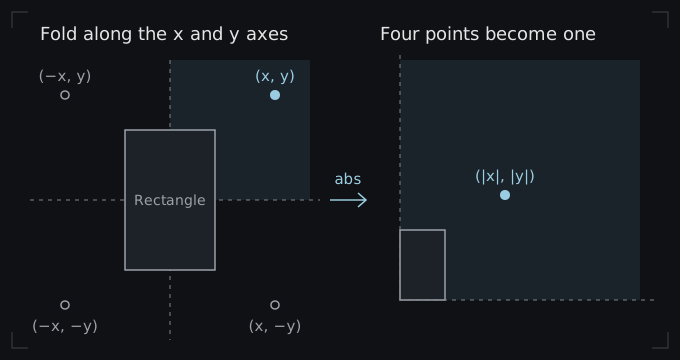
Once that’s done, wherever the circle is around the rectangle, you only have to think about the region x ≥ 0, y ≥ 0 (the first quadrant). That’s why branching goes away. And since the part of the rectangle left in that region is a quarter, from the center to the corner, what we needed all along was half the width and height.
2. Make the rectangle’s corner the origin
Next we subtract halfWidth and halfHeight. This moves the circle so that the rectangle’s corner becomes the origin.
The resulting dx and dy tell you how far the circle’s center is from the rectangle’s right and top edges. Positive means outside the edge, negative means inside it.
3. Find the distance, then subtract the radius
The last line looks hard, but it’s actually doing the same thing as the first circle-vs-circle test.
First, inside length(...), a negative dx or dy is replaced with 0 (max(dx, 0.0)). A negative dx means the circle’s center is within the rectangle’s width, so it isn’t away from the rectangle in the x direction. The same goes for dy. Pass the values that remain to length, and the plain point-to-point distance formula gives you the distance from the circle’s center to the rectangle’s surface.
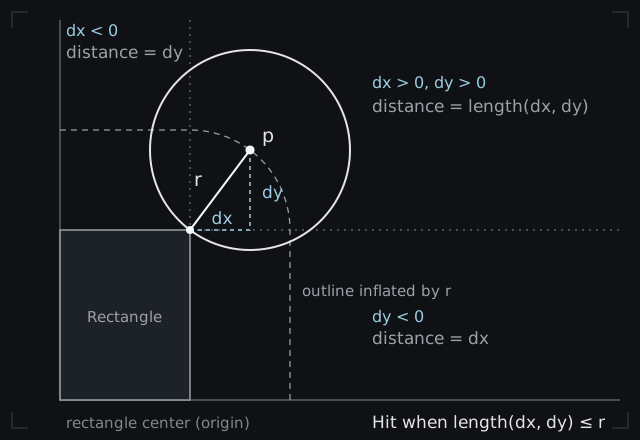
Finally, subtract radius and check whether the result is 0 or less, and the test is done. What this checks is whether the circle’s center is inside the rounded rectangle you get by inflating the rectangle by radius. It’s exactly the same idea as in the first circle-vs-circle test, where we turned one circle into a point and inflated the other.
Closing
I used a rectangle and a circle as one example of distance-function collision here, but if you push it, I think you could also do line segment vs line segment, capsule vs capsule, and even rectangle vs rectangle.
If you have a collision test of your own that you’d like to share, please write it up and help keep this corner lively.
This post is the one I wrote on Zenn, with the wording and diagrams reworked for this site. The original (in Japanese) is on Zenn.